




You've recorded your first episode (or your fiftieth) and now you're staring at a big, messy audio file wondering what to edit it with.
The good news is there has never been more choice. The bad news is there has never been more choice!
Some editors look like a recording studio from the 90s. Others let you delete a word from a transcript and it disappears from the audio. A few will clean up your sound, level your voices, and spit out a finished episode without you touching a single waveform.
I've split this list up by how you like to work, so you can skip straight to the section that fits you. If you just want my quick picks, they're right below.
Best Podcast Editing Software: Quick Picks
- Easiest for beginners: Alitu
- Best text-based editor: Descript
- Best if you record remote interviews: Riverside
- Best free option (Mac): GarageBand
- Best free option (Windows & Linux): Audacity
- Best for professional, story-driven shows: Hindenburg PRO
- Best for Adobe users: Adobe Audition
- Best for video podcasts: DaVinci Resolve
- Best “finishing” tool: Auphonic
Podcast Editing Software Comparison
| Software | Best For | Price | Platform | Text-Based Editing | Video |
|---|---|---|---|---|---|
| Alitu | Beginners | From $32/mo (annual) | Browser | Yes | Yes |
| Descript | Editing by transcript | Free plan, paid from $16/mo (annual) | Mac, Windows, Browser | Yes | Yes |
| Riverside | Remote interview shows | Free plan, paid from $24/mo (annual) | Browser | Yes | Yes |
| Async (ex-Podcastle) | Budget all-in-one | Free plan, paid from about $12/mo | Browser | Yes | Yes |
| GarageBand | Free on Mac | Free | Mac, iPhone, iPad | No | No |
| Audacity | Free on any computer | Free | Mac, Windows, Linux | No | No |
| Adobe Audition | Adobe users | $22.99/mo (annual) | Mac, Windows | No | No |
| Hindenburg PRO | Spoken word & storytelling | From $8.25/mo (annual) | Mac, Windows | Yes | No |
| REAPER | Power users on a budget | $60 one-time | Mac, Windows, Linux | No | Basic |
| Logic Pro | Mac users who want more | $199.99 one-time | Mac | No | No |
| DaVinci Resolve | Video podcasts | Free, Studio is $295 | Mac, Windows, Linux | Yes | Yes |
| Auphonic | Leveling & loudness | 2 hrs/mo free | Browser | No | Yes |
| Adobe Podcast | Fixing bad audio | Free plan | Browser | Yes | Premium only |
| iZotope RX | Serious audio repair | From $99 one-time | Mac, Windows | No | No |
Prices as of October 2026. Most companies discount annual plans, so I've listed those where they're the lowest price.
Easiest Podcast Editing Software
These are built for podcasters first. You won't need to learn what a compressor is, and most of them handle the audio cleanup for you.
Alitu

Alitu is the tool I point people to when they tell me editing is the reason they haven't launched yet.
It's a “podcast maker” that runs right in your browser, so there's nothing to install. You upload your recording and Alitu cleans it up automatically: background noise removal, leveling, and the mixing that makes your voice sound consistent from start to finish.
Then you build the episode like you're stacking blocks. Intro music, your main segment, an ad spot, your outro. Done!
Here's what's included:
- Automatic noise removal and audio cleanup
- Text-based editing (delete words from the transcript to cut them from the audio)
- A library of royalty-free music and jingles
- Recording for solo shows and remote calls, including 1080p video
- Transcripts in 17 languages
- Free hosting up to 1,000 downloads a month, plus a free podcast website
- One-click publishing to Apple Podcasts
If you'd rather not edit at all, Alitu also has a done-for-you editing service where their team edits your episodes with a 4-day turnaround.
Price: $38/month, or $32/month billed annually. Done-for-you editing is $295/month (first month $1).
There's a 7-day free trial and a 30-day money-back guarantee after that, so sign up here and give it a try!
Descript
Descript changed how a lot of people edit podcasts. Instead of hunting through a waveform, you edit a transcript like a Google Doc.
Delete a sentence and it's gone from the audio (and the video). Move a paragraph and the audio moves with it. For interview shows where you're mostly cutting tangents and “ums,” this is a huge time saver.
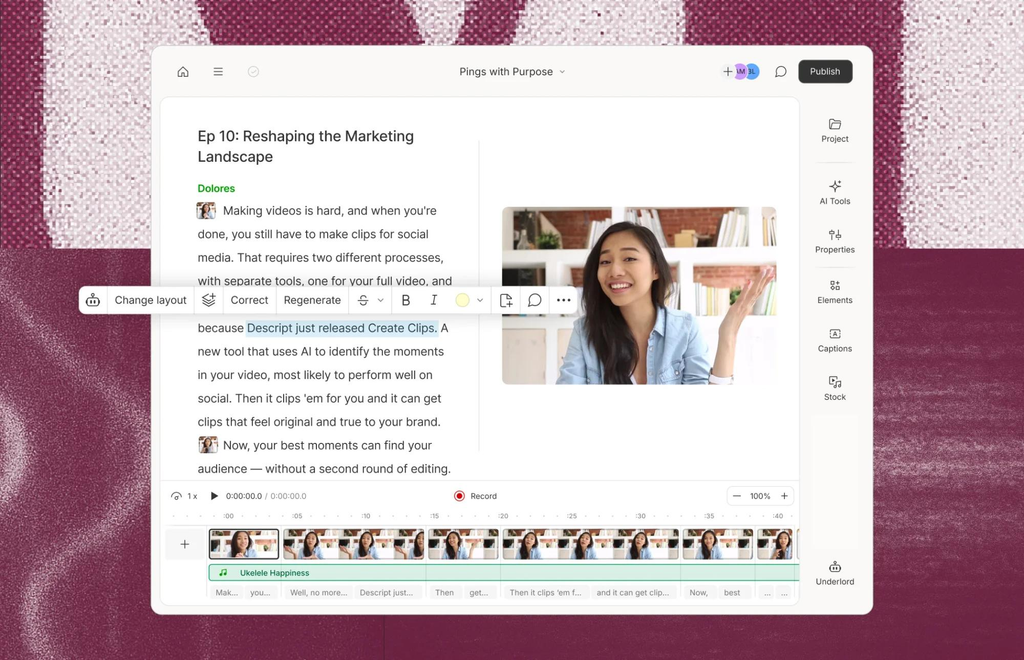
Edit Your Podcast Like A Doc
A few features I'd point out:
- Filler word removal: removes “um,” “uh,” and repeated words across a whole episode in one click
- Studio Sound: their AI voice enhancement that cuts room echo and background noise
- Underlord: an AI assistant that can do rough cuts, write show notes, pull clips, and more
- Screen and remote recording built in
It also does video, so if you post full episodes on YouTube it can be your one editor for everything.
The trade-off is that Descript is less precise than a traditional editor when you need to fine-tune music beds or fades. And plans are based on media hours and AI credits, so a weekly two-hour show can push you into the higher tier.
Price:
- Free: 60 media minutes/month, 720p exports
- Hobbyist: $16/month billed annually ($24 month-to-month), 10 media hours/month
- Creator: $24/month billed annually ($35 month-to-month), 30 media hours/month, 4K exports
- Business: $50/month billed annually ($65 month-to-month)
Riverside

Riverside started as a remote recording studio (see our best podcast interview software post for more on that side of it), and its editor has gotten good enough to stand on its own as an editor.
It records each person locally, so you get separate high-quality tracks even if someone's internet drops for a second. Then you can edit right there using the transcript, with no downloading and re-uploading files between apps.
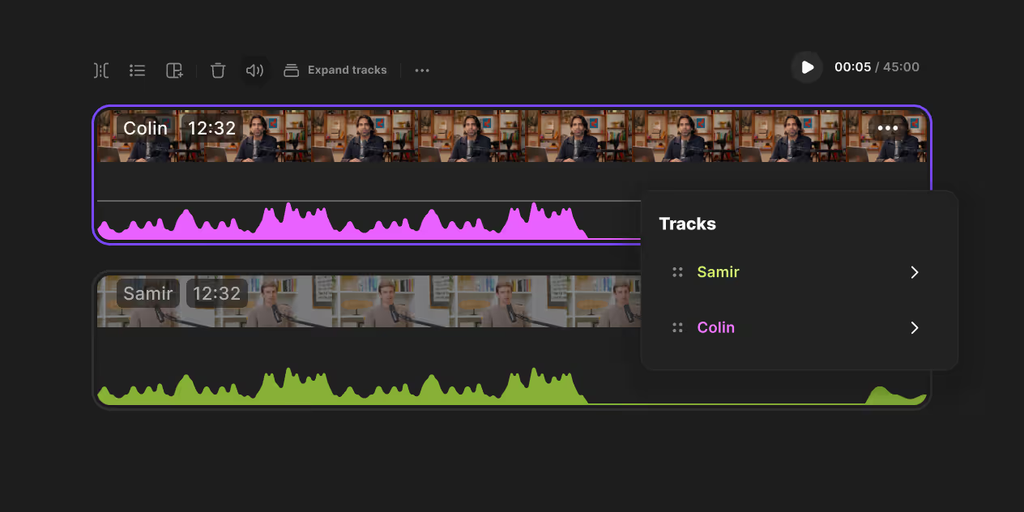
Record & Edit In The Same Place
What stands out:
- Text-based editing on every paid plan
- Magic Audio to clean up and level each speaker
- Magic Clips that pull short, vertical videos for social media
- AI show notes and an AI editing agent for rough cuts
- Built-in podcast hosting and publishing
If you record interviews with remote guests, this keeps the whole workflow in one place.
Price: Free plan with 2 hours of multitrack recording (watermarked). Pro is $24/month billed annually ($29 month-to-month). Grow is $34/month billed annually ($39 month-to-month).
Async (Formerly Podcastle)
Podcastle rebranded as Async, and it's now an AI-heavy creator studio for audio and video.
You can record, edit by transcript, and clean up your audio with their “Magic Dust” enhancement. It also has a big set of AI extras like text-to-speech voices, auto subtitles, and background removal for video.
It's a decent budget alternative to Descript, though the free plan is pretty limited (1 hour of uploads, 720p exports, and 10 lifetime AI credits).
Price: Free plan available. Paid plans start around $11.99/month and they advertise up to 40% off with yearly billing.
Free Podcast Editing Software
If you're just getting started (or on a tight budget), you can edit a great-sounding podcast for free. These two have been around forever for a reason.
GarageBand
GarageBand is free on every Mac, and it's what I walk through in my how to start a podcast tutorial.
You get separate tracks for your voice, guests, music, and ad spots. You can fade things in and out, move them around, and add plug-ins like compression and EQ to each track.
My biggest tip is to set up a template once. Put your intro and outro music in place, add your vocal effects, and save it. Then every new episode starts with “File > Save As” and you're halfway done.
There's no transcript editing and no AI cleanup, so pair it with Auphonic or Adobe Podcast if your recordings need help.
Price: Free (Mac, iPhone, and iPad only).
Audacity
Audacity is the go-to free editor for Windows and Linux (it works on Mac too). It's open source and has been downloaded over 100 million times.
Audacity 4 came out with a much cleaner interface than the old version, plus workspaces so you can hide the tools you don't use. If you tried it years ago and hated how it looked, it's worth another look.
It handles all the basics: cutting, multitrack editing, noise reduction, compression, normalization, and exporting to MP3. There's a huge library of free plug-ins, and you can back up projects to audio.com to share with a co-host or editor.
The learning curve is a bit steeper than GarageBand, but there are thousands of tutorials on YouTube for pretty much every task.
Price: Free (Mac, Windows, and Linux).
Professional Podcast Editing Software
These are traditional DAWs (digital audio workstations). They take longer to learn, but you'll have full control over every detail of your sound.
Adobe Audition
Adobe Audition is one of the most popular pro editors for podcasts. It's built for spoken audio as much as music, which makes it a great fit.
It has two modes. The waveform editor is for detailed work on a single file (like cleaning up a noisy recording), and the multitrack editor is where you build your episode with music, guests, and ads.
Some features podcasters love:
- Essential Sound panel: tag a clip as “Dialogue” and get simple sliders for loudness, clarity, and noise
- Spectral frequency display: “see” and remove sounds like a cough or a phone buzz
- Match Loudness: hit podcast loudness standards in a few clicks
- Remix: automatically stretch or shorten a music track to fit your intro
If you already pay for Creative Cloud, you probably have it. And it works nicely with Premiere Pro if you also edit video episodes.
Price: $22.99/month on an annual plan, or included with Creative Cloud Pro.
Hindenburg PRO

Hindenburg was made for radio journalists, and it shows. It's built around the spoken word, not music, which makes it one of the most podcast-friendly editors out there.
When you import audio, it automatically sets levels for you. The clipboard feature lets you keep interview clips, ambience, and music organized off to the side until you need them. And it exports at broadcast-ready loudness, so you don't need to mess with LUFS settings.
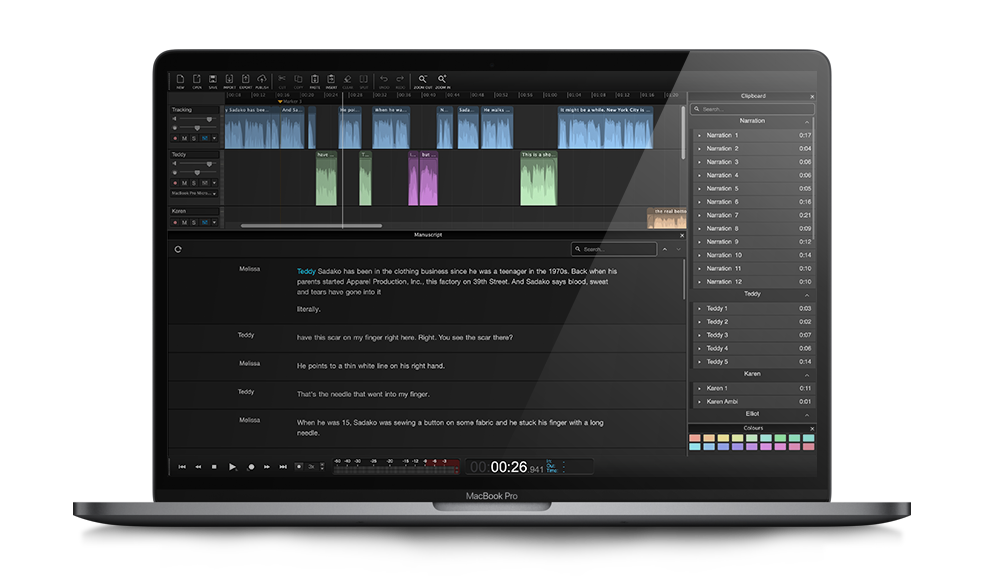
Hindenburg PRO Clipboard & Transcript Editing
Newer versions added transcription in 99 languages (including offline transcription) and transcript-based editing, which is great for narrative shows where you're working from a script.
If you make story-driven or documentary-style podcasts, this is the one I'd look at first.
Price: Subscription plans start at about $12/month (Standard, Plus, and Premium tiers, with more transcription hours on the higher plans). There's a free trial.
REAPER
REAPER is a full professional DAW that costs a fraction of the big names. It's fast, lightweight, and runs on pretty much any computer.
It can do everything Audition or Pro Tools can do, and a lot of professional podcast editors use it every day. Out of the box it isn't set up for podcasting, but you can customize almost everything, and there are free podcast templates and scripts made by the community.
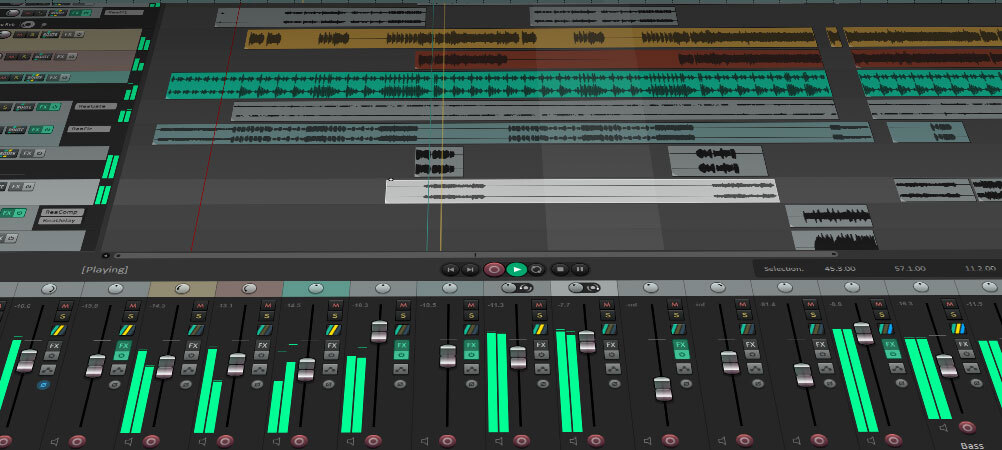
REAPER With Ripple Editing Turned On
One feature to turn on right away is ripple editing. When you cut a section, everything after it slides over to close the gap, which is exactly what you want when editing conversations.
Price: $60 for a personal license (or businesses making under $20,000/year), $225 commercial. The 60-day trial is fully functional.
Logic Pro
Logic Pro is GarageBand's big brother. If you've outgrown GarageBand, it's the natural next step because the layout will feel familiar and it opens your GarageBand projects.
You get much better plug-ins, more precise editing, and better mixing tools. It's built mainly for music, so there's some stuff you'll never touch, but the vocal processing is excellent.
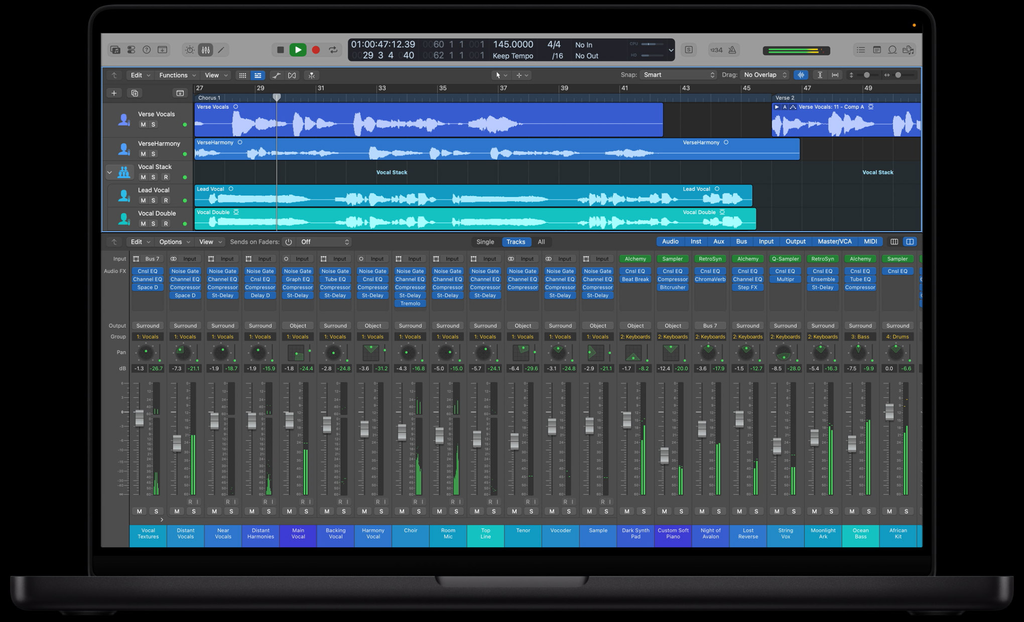
Logic Pro Podcast Session
Price: $199.99 one-time, or as part of Apple's Creator Studio subscription ($12.99/month or $129/year) with a 30-day free trial. Mac only.
DaVinci Resolve
More and more podcasts are video podcasts now, especially on YouTube. If that's you, DaVinci Resolve is worth a look because the free version is incredibly capable.
It's known as a video editor, but it has a full audio editing suite built in called Fairlight. That includes AI Voice Isolation (removes background noise), a Dialogue Leveler, and text-based editing so you can cut by transcript.
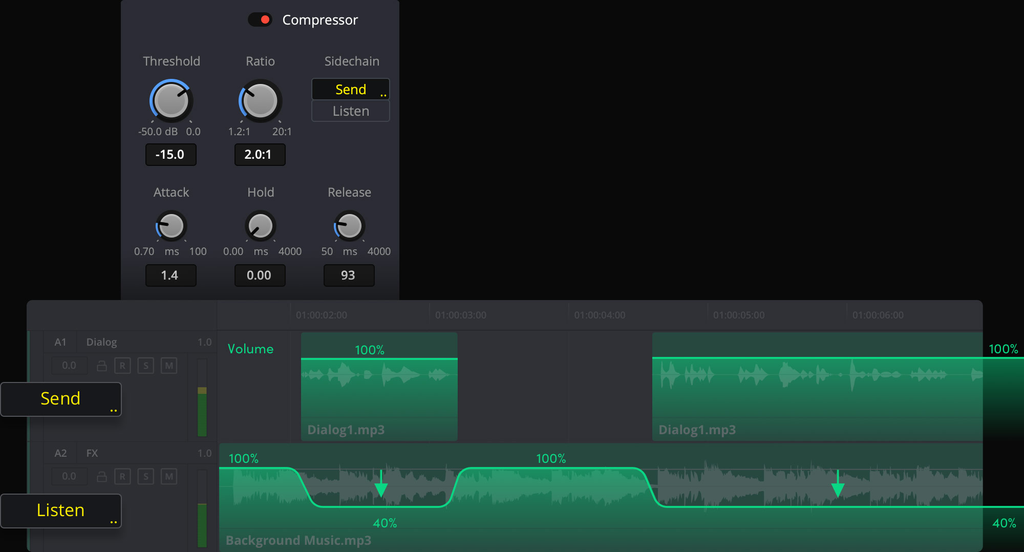
DaVinci Resolve Fairlight Audio Page
It's a lot of software, and it needs a fairly powerful computer. But if you want one program for both your video and audio without a subscription, this is it.
Price: Free. DaVinci Resolve Studio (with more AI features) is $295 one-time.
Audio Cleanup & Finishing Tools
These aren't full editors, but I'd recommend at least one of them no matter what you edit with. They fix problems that are hard (or impossible) to fix by hand.
Auphonic
Auphonic is the last step in my editing process. You upload your finished episode and it handles leveling, loudness normalization (LUFS), filtering, and noise reduction automatically.
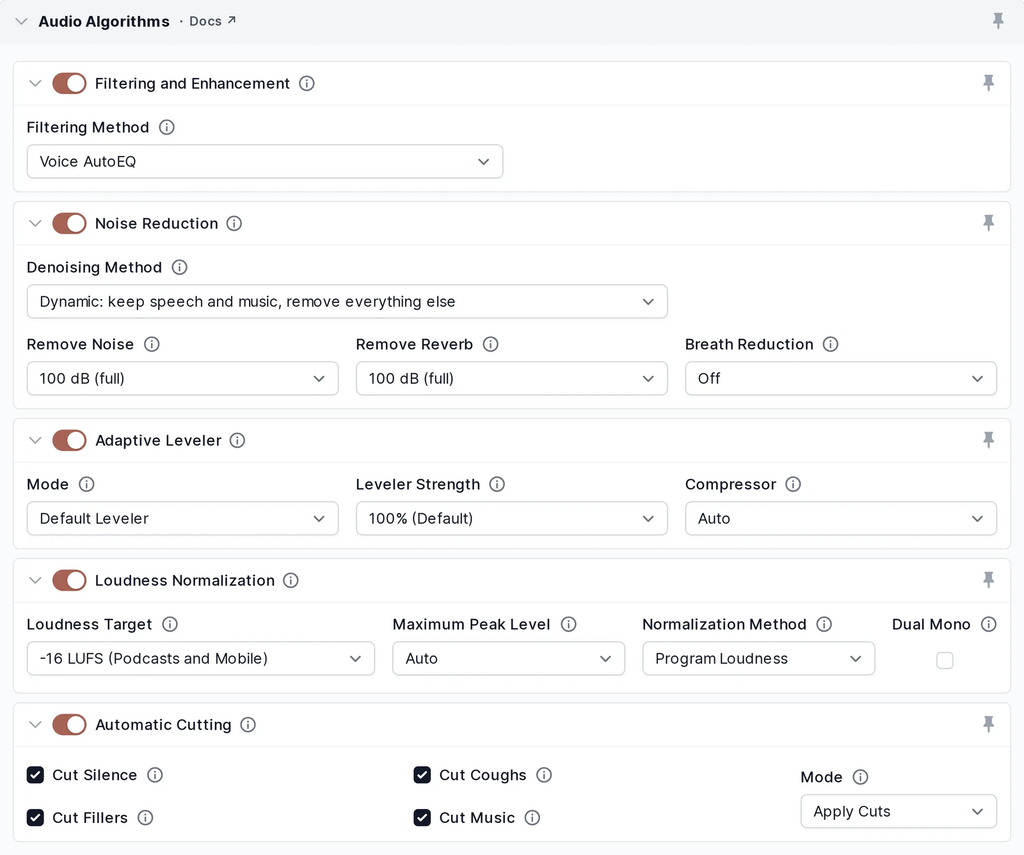
Auphonic Production Settings
It's especially good at fixing volume differences between hosts. If one person is loud and the other is quiet, Auphonic evens them out without you riding the faders.
It can also add your ID3 tags, generate transcripts and show notes, and publish straight to your host.
Price: 2 hours of audio per month free. Paid plans are based on hours processed, with monthly credits or one-time credits that never expire.
Adobe Podcast (Enhance Speech)

Adobe Podcast has a tool called Enhance Speech that's kind of magic. Upload a recording made on a laptop mic in an echoey kitchen, and it comes back sounding like it was recorded in a studio.
It isn't perfect. Pushed too hard it can sound a little robotic, so I'd save it for rescuing bad recordings. Adobe Podcast also has a browser-based studio for recording and editing by transcript.
Price: Free plan handles files up to 30 minutes and 1 hour of enhancement per day. Premium (included with Adobe Firefly Pro) raises that to 2-hour files and 4 hours a day, adds video files, and lets you adjust the strength.
iZotope RX
iZotope RX is what audio engineers use to fix problems other tools can't. Mouth clicks, plosives, hum, clipping, reverb, a dog barking in the background. RX can usually fix it.
RX 12 added better Dialogue Isolate and Breath Control modules. It works as a standalone app and as plug-ins inside Audition, REAPER, Logic, and most other editors.
Price: RX 12 Elements is $99, Standard is $399, and Advanced is $1,399. Most podcasters will be fine with Elements, and it goes on sale often.
How To Choose Podcast Editing Software
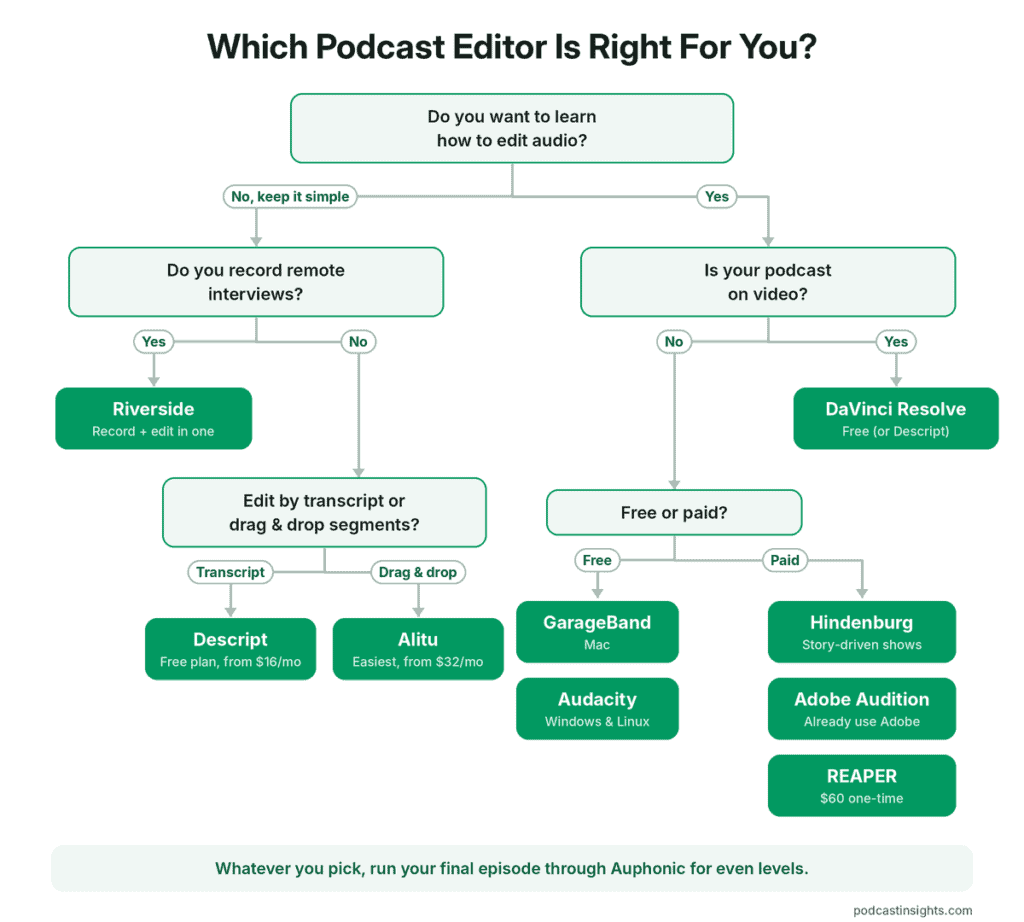
There isn't one “best” editor for everyone. Here's how I'd think about it:
How much time do you want to spend editing? If the answer is “as little as possible,” go with Alitu, Descript, or Riverside. They do a lot of the work for you.
Do you edit by ear or by reading? If you mostly cut tangents and mistakes in conversations, text-based editing (Descript, Riverside, Alitu, Hindenburg) is much faster. If you're mixing music, sound effects, and lots of layers, a traditional editor gives you more control.
Is your show audio-only or video? For video podcasts, look at Descript, Riverside, or DaVinci Resolve. GarageBand, Audacity, and Audition are audio only.
What's your budget? You can make a great podcast with GarageBand or Audacity plus Auphonic's free plan. Once editing starts eating up your weekends, that's when a paid tool pays for itself.
Which computer do you use? GarageBand and Logic are Mac only. Everything else on this list works on Windows too (or right in your browser).
Common Podcast Editing Questions
What is the best free podcast editing software?
GarageBand if you have a Mac, and Audacity if you're on Windows or Linux. DaVinci Resolve is also free and is the best free choice for video podcasts.
What is the easiest podcast editing software for beginners?
Alitu. It handles audio cleanup automatically and you build episodes by dragging segments into place. Descript is a close second if you'd like to edit using a transcript.
What editing software do most podcasters use?
There's no single answer, but Audacity, GarageBand, Adobe Audition, and Descript are some of the most widely used. Many professional editors use REAPER or Pro Tools.
Can AI edit my podcast for me?
Partly. Tools like Descript, Riverside, and Alitu can remove filler words, clean up audio, cut silences, and make a rough cut. You'll still want to listen through before publishing, since AI doesn't know which tangent was the funny one.
Do I need separate software for recording and editing?
Not anymore. Most of the tools above can record too. Check out our best podcast recording software post if recording is your main concern, and our best podcast interview software post for remote guests.
How long does it take to edit a podcast?
It depends on your show, but a common rule of thumb is 2 to 4 hours of editing per hour of audio with a traditional editor. Text-based and AI tools can cut that way down.
Final Recommendations
If you're brand new and want to get your first episode out this week, start with Alitu. If you'd rather edit by transcript or you also need video, go with Descript.
If you want free, use GarageBand on a Mac or Audacity on a PC, and run your final file through Auphonic.
And if you're ready to go pro, Adobe Audition, Hindenburg, and REAPER will all serve you well for years.
The best editor is the one you'll actually open every week, so don't overthink it. Pick one, edit an episode, and switch later if it isn't working for you.
Once your episode is edited, you'll need somewhere to put it. Check out our list of the best podcast hosting platforms next, and if your audio still isn't where you want it, it might be time to upgrade your podcast microphone.